
This release marks a fundamental shift in how AI powered directory software works.
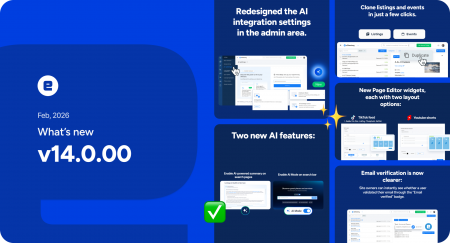
eDirectory v14.0 introduces a new AI-driven discovery experience designed for how people search today — and how they will search tomorrow. Instead of forcing users to navigate categories or guess keywords, this version transforms your directory into an intelligent platform that understands intent, context, and natural language.
Headlining this release is our brand-new AI Search system, along with major performance improvements, new widgets, and backend enhancements designed to increase engagement, overall performance, and revenue potential.
Let’s explore what’s new in eDirectory v14.0.
AI-Powered Search & Discovery
A New Core Experience in eDirectory v14.0
Search is no longer just a feature. In eDirectory v14.0, it becomes the foundation of the entire user experience.
This release moves eDirectory beyond traditional keyword searches and rigid category navigation. Instead, it introduces an AI-powered discovery experience designed around how people actually search today — by asking questions, adding context, and expecting immediate clarity.
With AI at the core, users find what they need faster, with less friction, and with results that feel intuitive and relevant from the first interaction.
AI Search Summaries
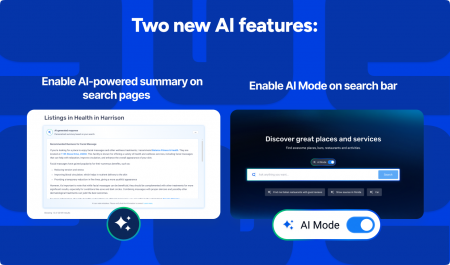
Search results now begin with AI-generated summaries displayed at the top of the page.
These summaries provide instant context, helping users understand the landscape of available options before scrolling through individual listings. Instead of scanning blindly, users get a clear overview that supports faster decisions and keeps them engaged.
For site owners, this means fewer drop-offs, higher interaction rates, and a smoother path from search to action. Summary behavior is fully configurable through the new AI settings, giving administrators control over tone, structure, and presentation.
See it in action here.
Natural Language Search (AI Mode)
Users no longer need to think in keywords.
With AI Mode enabled in the search bar, visitors can type full questions or detailed requests using natural language — the same way they interact with modern AI tools and assistants. The system interprets intent, context, and nuance to return results that actually match what the user is looking for.
This dramatically improves usability, especially for first-time visitors who may not know how your directory is structured. Searches feel conversational, guided, and effortless, reducing frustration and improving overall satisfaction.
See it in action here.
Extendable AI Knowledge Base
To remain the most flexible AI powered directory software on the market, eDirectory v14.0 allows site owners to expand what the AI knows.
By adding localized content such as neighborhood articles, market-specific guides, or relevant news, the AI Search experience becomes tailored to your audience and region. This transforms your directory from a static listing platform into a living knowledge hub that grows smarter and more valuable over time.
As content expands, search results become richer, more contextual, and increasingly aligned with your business goals and community needs.
Redesigned AI Settings tab
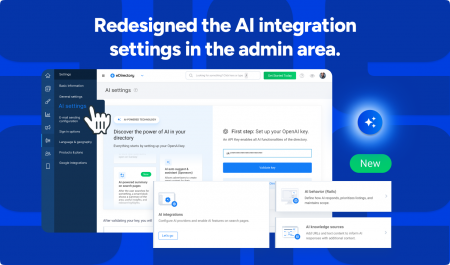
To support this AI-first evolution, the admin interface has been redesigned.
All AI-related features and configurations are now centralized in a dedicated AI Settings section. This makes it easier to manage, customize, and scale AI functionality from a single place, while giving administrators full visibility into how AI is powering the platform.
This redesign marks a new era for eDirectory as a fully AI powered directory software solution.
New Widgets & Content Options
To enhance content presentation and engagement, eDirectory v14.0 introduces new widgets and layout options.
New Widgets in the Page Editor
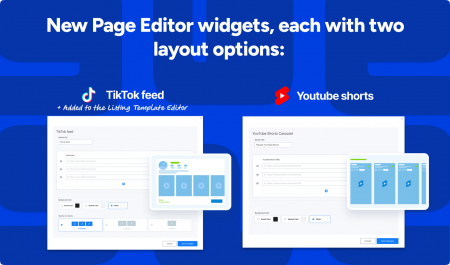
Two new social media widgets are now available, each with multiple layout options:
-
TikTok Feed
-
YouTube Shorts
These widgets allow you to showcase dynamic, short-form video content directly on your pages, increasing engagement and visual appeal.
Listing Template Enhancements
A dedicated TikTok Feed widget is also available inside the Listing Template Editor, enabling individual listings to feature short-form video content as part of their profile.
Clone Listings and Events
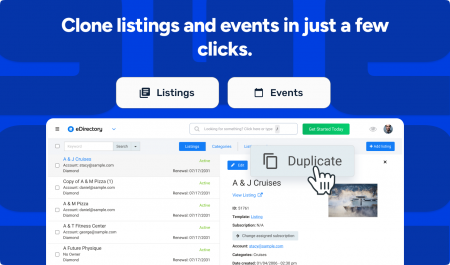
Creating new listings and events is now faster and more efficient than ever. With the new Clone Listings and Events feature, site managers can duplicate existing entries in just a few clicks.
This is especially useful when adding similar businesses, creating recurring or seasonal events, or launching multiple listings with shared information. Cloning preserves key details such as descriptions, images, categories, and overall settings — eliminating repetitive manual work and reducing the risk of inconsistencies.
The result is a more streamlined workflow, better content standardization across the platform, and significant time savings for teams managing large or growing directories.
Email Verification
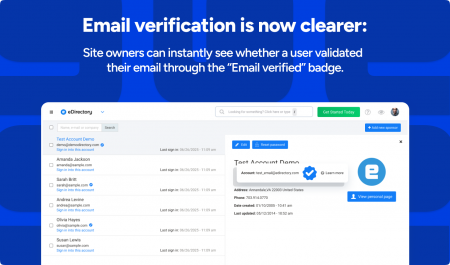
Email verification is now clearer and more transparent across the platform. Verified users are instantly identifiable through a dedicated email verification badge, giving site owners immediate visibility into account authenticity.
This improvement strengthens trust between users and administrators, reduces confusion during account approval processes, and helps prevent misuse or fraudulent activity. By making verification status obvious at a glance, site owners can manage submissions more confidently while maintaining a more secure and credible directory environment.
Additional Platform Improvements
-
Form Improvements
Contact forms for listings, events, and classifieds now include a phone number field, making communication easier and more effective. -
Faster Results
Additional backend optimizations deliver quicker response times across search and results pages.
Other Minor fixes in this release
languages.
2. Fixed an SQL error that was affecting the statistics reports pages for events, classifieds,
and blog in the site manager.
3. Fixed SQL error in Payment Reports when exporting invoices.
4. Fixed product types not displaying correctly in the Related Listings widget settings in
the Listing Template Editor.
5. Fixed the loading component in the widget Pricing & Plans with full detail preview not
using the site owner’s configured color.
6. Fixed line breaks in the Price & Plans comparison widget.
7. Fixed category search in the listing form when the listing belongs to a template with a
specific category set.
8. Updated AI auto-suggest and auto-complete prompts to avoid punctuation characters
in the keywords field.
9. Fixed the “search widgets by title” input in the Page Editor not staying sticky at the top
of the pop-up while scrolling.
10. Fixed spacing between the username field and the account activation message in the
sponsors area.
11. Fixed the z-index of the pop-up used to select a subscription during the claim process.
12. Added validation to hide the Manage discount codes link when the payment feature is
disabled.
13. Fixed image descriptions and alt tags not being truncated in the Manage Gallery
section.
14. Fixed the subscription link not appearing in the email notification after approving an
invoice.
15. Fixed duplicate <h1> tags in:
a. Listing, Classified, and Event detail pages
b. Search box with slider widget
16. Fixed the support link in the subscription component redirecting to the eDirectory
support portal instead of the sponsor’s help page.
17. Fixed animated GIF banners not displaying correctly on the frontend.
18. Added the missing Leaflet marker icon for Retina displays.
19. Updated the pt_br translation for “Get directions” to a more user-friendly version.
20. Fixed the Spanish translation of the “Sign in options” menu item.
21. Fixed badge sizing in the listing detail sidebar and sponsors form.
22. Fixed user image alignment in the Recent Members widget.
23. Removed extra spaces between the categories enum and the listing template in
exported file headers, which were preventing auto-mapping during import.
24. Fixed the Yelp logo display on the listing detail page.
25. Fixed the Stripe webhook format issue that prevented new payment records from being
saved.
MORE IN-DEPTH CONTENT ABOUT VERSION 14.0
- How to integrate Chatgpt
- Ai Powered Search
- AI Knowledges
- How to configure Qdrant
- Email Verification Status
Video Overview
Ready to Upgrade?
This new eDirectory version represents a significant step forward in the AI powered directory software era. The combination of AI-powered features and stability improvements makes this update essential for competitive directory operations.
- Are you an existing eDirectory customer? Fill out the upgrade request form: Upgrade Now
- New to eDirectory? Experience the power of the industry’s leading AI powered directory software with a personalized demo:Request Demo