
We’ve just released eDirectory v14.3!
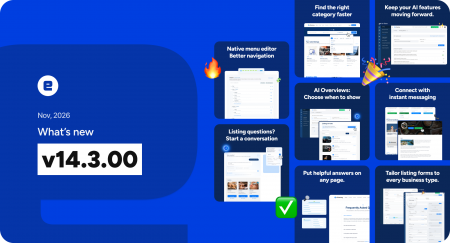
This release introduces new ways to improve navigation, help visitors find information, and connect with businesses. From a native menu editor and AI-powered listing questions to more flexible FAQ widgets and enhanced search options, v14.3 brings new tools to help you create a better experience for your visitors and advertisers.
Available now for all active licenses. Upgrade now! or Request a demo!
What’s New in eDirectory v14.3:
Native Navigation Menu Editor
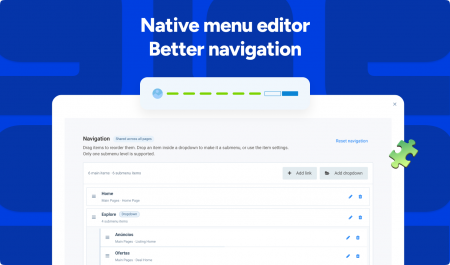
Build and customize your website navigation more easily.
eDirectory now includes a native menu editor directly in the Page Editor, giving you more control over your header navigation.
The Dropdown Menu plugin is now part of the standard product, replacing the previous navigation editor. This makes it easier to organize your website menus and create a navigation experience that fits your directory.
Meet the New Have a Question Widget
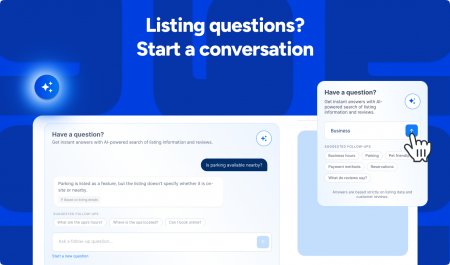
Give visitors a smarter way to learn about businesses.
The new Have a Question widget uses AI to answer visitors’ questions about individual listings.
Visitors can ask quick questions and receive answers based on each listing’s public content. Responses can include clickable links, suggestions, and contact actions, helping users find relevant information and take the next step.
This creates a more interactive experience while helping visitors discover what each business has to offer.
Category Selection in Search Widgets
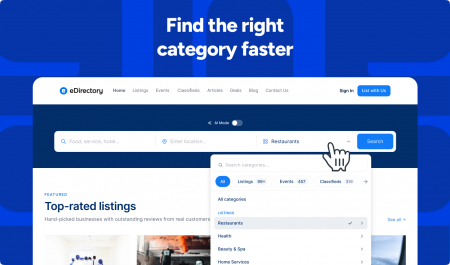
Help visitors find what they’re looking for faster.
You can now add a category selector to Search Bar and Search Box widgets, allowing visitors to narrow down their searches right from the beginning.
By choosing a category before searching, visitors can reach more relevant results with fewer steps.
More Flexible Listing Form Labels
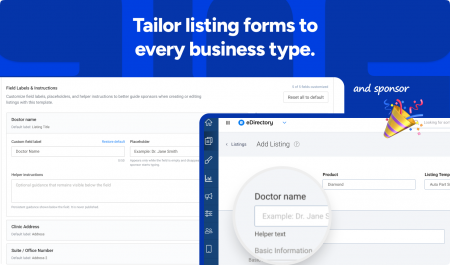
Make listing submissions clearer for every type of business.
You can now customize the labels for important listing fields directly in the Template Editor, including:
- Listing Title
- Description
- Summary Description
- Address
- Address 2
Each listing template can have its own labels, which will also appear in the sponsor submission form.
This gives you more flexibility to adapt your forms to different business types and makes it easier for advertisers to understand what information they need to provide.
Choose How AI Overviews Work
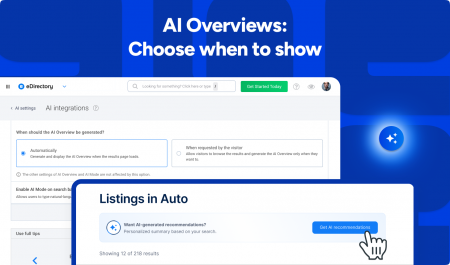
Give visitors more control over AI-generated search summaries.
With eDirectory v14.3, you can choose how AI Overviews are displayed when the feature is enabled:
- Automatic generation: AI Overviews are generated automatically for visitors.
- On-demand generation: Visitors can choose when to request an AI-generated summary.
This gives site owners more flexibility to decide how AI-powered search experiences work on their websites.
Existing installations will retain automatic generation.
New FAQ Widgets and Improved FAQ Management
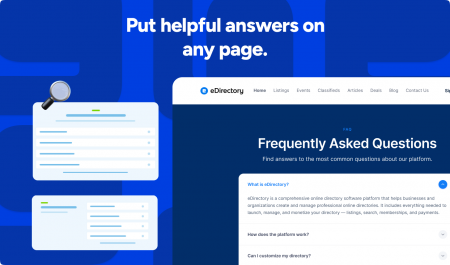
Make helpful information available throughout your website.
eDirectory v14.3 introduces two new reusable FAQ widgets, allowing you to add up to 50 questions per widget anywhere on your site.
The FAQ management experience has also been reorganized:
- The former FAQ Box widget is now called FAQ with Search.
- The main FAQ page has been reorganized.
- Sponsor FAQs can now be managed directly under Settings.
These improvements make it easier to organize frequently asked questions and provide useful information wherever visitors need it.
Improved Instant Messaging on Listing Cards
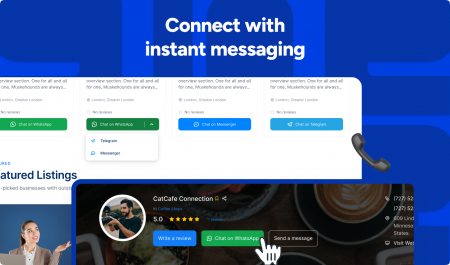
Make it easier for visitors to connect with businesses.
WhatsApp and other supported instant messaging options can now appear in more places across your website, including:
- Listing cards in Listings & Cards widgets
- Search result summaries
- Listing detail page headers
By making contact options more visible, you give visitors additional opportunities to reach businesses directly.
Updated AI Model
Keep your directory’s AI-powered tools up to date.
OpenAI-powered features have been updated to use gpt-6-luna, bringing the newer model to eDirectory’s AI tools.
This update supports the continued development of AI-powered experiences across the platform.
Behind the Scenes Improvements
In addition to the new features, eDirectory v14.3 includes several improvements to make everyday website management and visitor experiences more reliable.
+ Improved Deals Display
Deals now display their regular price correctly when a discount hasn’t been provided, preventing products from appearing as free or having an incorrect zero price.
+ Better Listing and Search Results
Listing summaries, highlight cards, centered cards, and search results have received layout and display improvements across different templates and screen sizes.
These updates address issues with clipped text, category menus, icons, contact information, and Yelp ratings.
+ Improved Reviews Display
Review ratings and sections now display more accurately, preventing empty review sections or ratings from appearing when no reviews are available.
+ Better AI Content Generation
Several improvements have been made to AI Assist and AI SEO, including more reliable HTML formatting, longer content generation, and improved suggestions.
+ Improved Exports and Account Management
CSV exports, invoice searches, plan editing, and custom product field quantities have received improvements to make administrative tasks more consistent and reliable.
+ Mobile and Time Zone Improvements
Business hours now calculate more accurately for Canadian time zones, and mobile app search results handle listings with invalid location coordinates more reliably.
Minor Fixes
This release also includes a wide range of smaller fixes and refinements across the platform, helping deliver a smoother experience for both website visitors and administrators.
Updates include:
- Fixed YouTube Shorts carousel loading issues.
- Improved slider captions and mobile typography.
- Corrected listing website links.
- Fixed AI Assist buttons in the Site Manager editor.
- Improved AI Mode search behavior and fallback options.
- Fixed AI Consultant knowledge source selection.
- Improved avatar handling for accented names.
- Corrected branding and page title issues in the Site Manager and sponsor area.
- Fixed the Advertise page trial button display when recurring payments are unavailable.
- Improved search indexing to prevent HTML tags from being included in keywords.
- Corrected Portuguese translations.
View Full Changelog for eDirectory v14.3
More In-Depth Content About Version 14.3
Our support articles will guide you through the new features and show you how to configure them:
- eDirectory 14.3 Release Overview
- How to Display Instant Messaging Options on Listings
- How to Enable Category Selection in Search Widgets
- How to Manage FAQs Using the New FAQ Widgets and Page Editor
Ready to Upgrade?
eDirectory v14.3 brings new ways to make your directory more interactive, easier to navigate, and more helpful for visitors.
With smarter AI-powered tools, improved search experiences, flexible FAQ widgets, and better ways for visitors to connect with businesses, this release gives you even more tools to build and grow your online business.
- Are you an existing eDirectory customer? Fill out the upgrade request form: Upgrade Now
- New to eDirectory? Discover what eDirectory can do for your business: Request a Demo